Für Mac, iPad und iPhoneFor Mac, iPad and iPhone

Professionelle Charts.
Endlich einfach.
Pro charts.
Finally easy.

Chord-Charts und Leadsheets per Tastatur, Klopfen, Singen oder direkt aus der Probenaufnahme. Bereit für die Bühne. Chord charts and lead sheets from typing, tapping, singing or straight from your rehearsal recording. Stage-ready.

macOS · iPadOS · iOS · iCloud-Sync · funktioniert offlinemacOS · iPadOS · iOS · iCloud sync · works offline

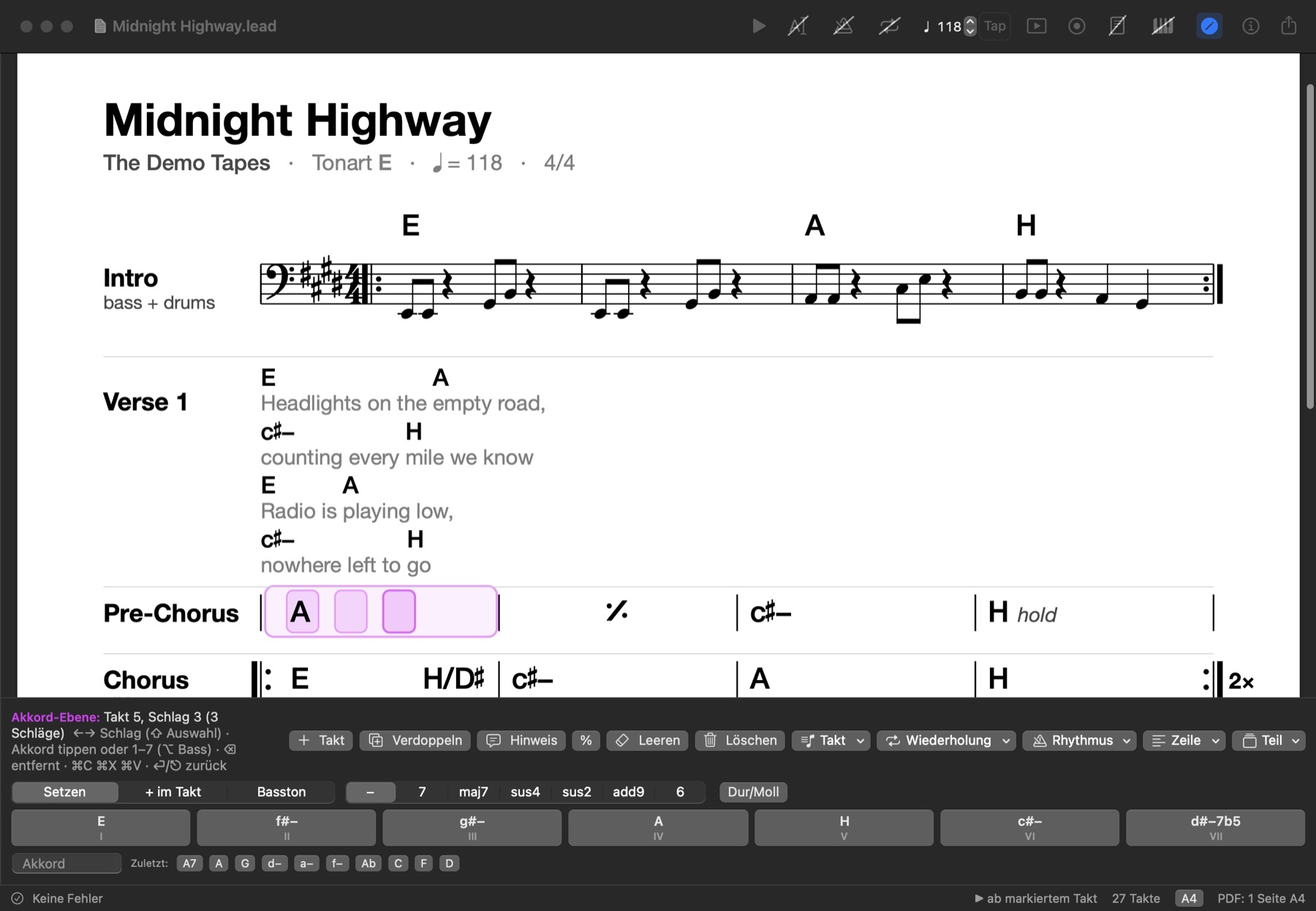
GigChart Pro auf dem Mac: grafischer Editor mit Akkord-Ebene
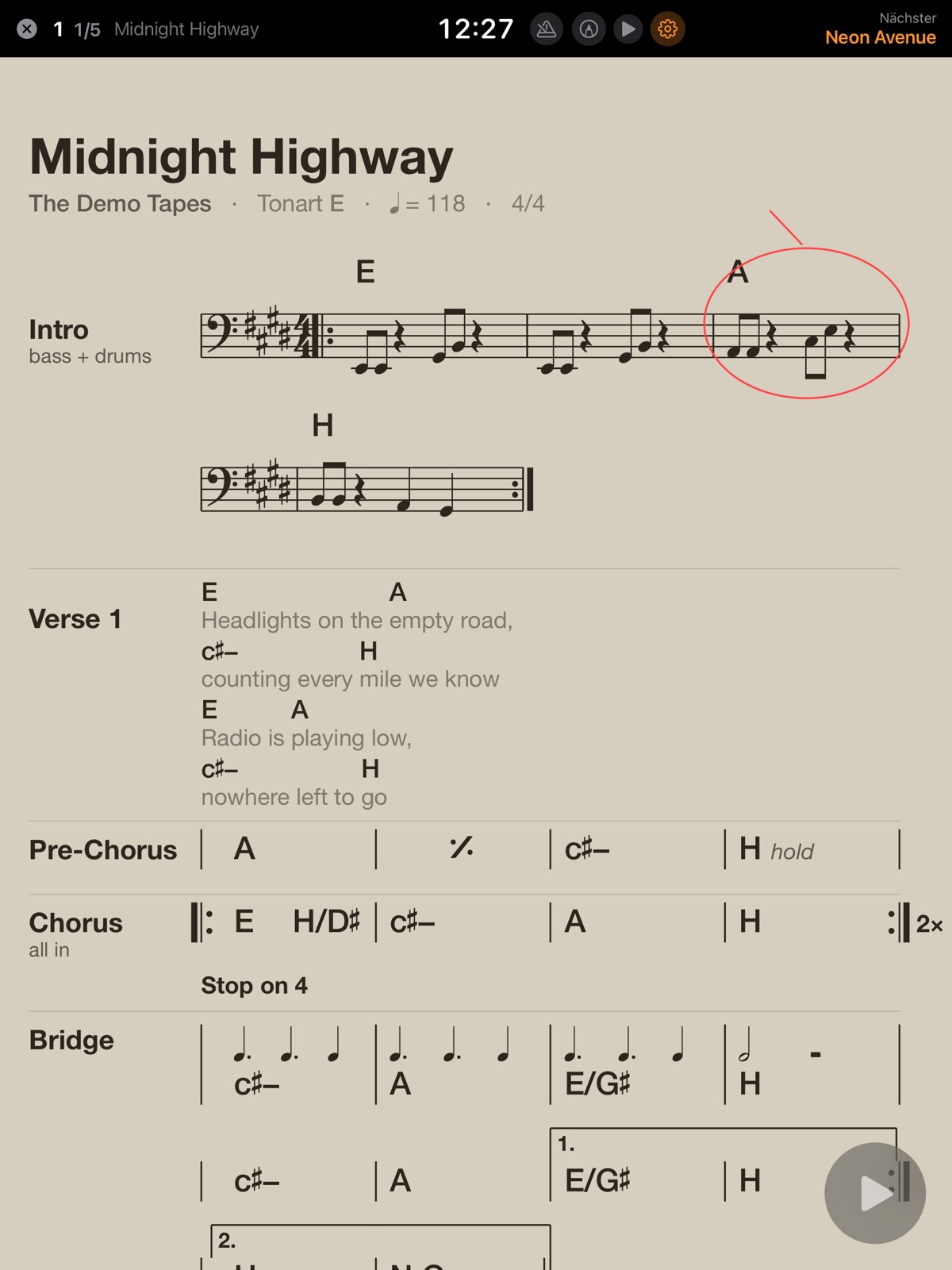
iPad Live-Ansicht mit Stift-Notiz
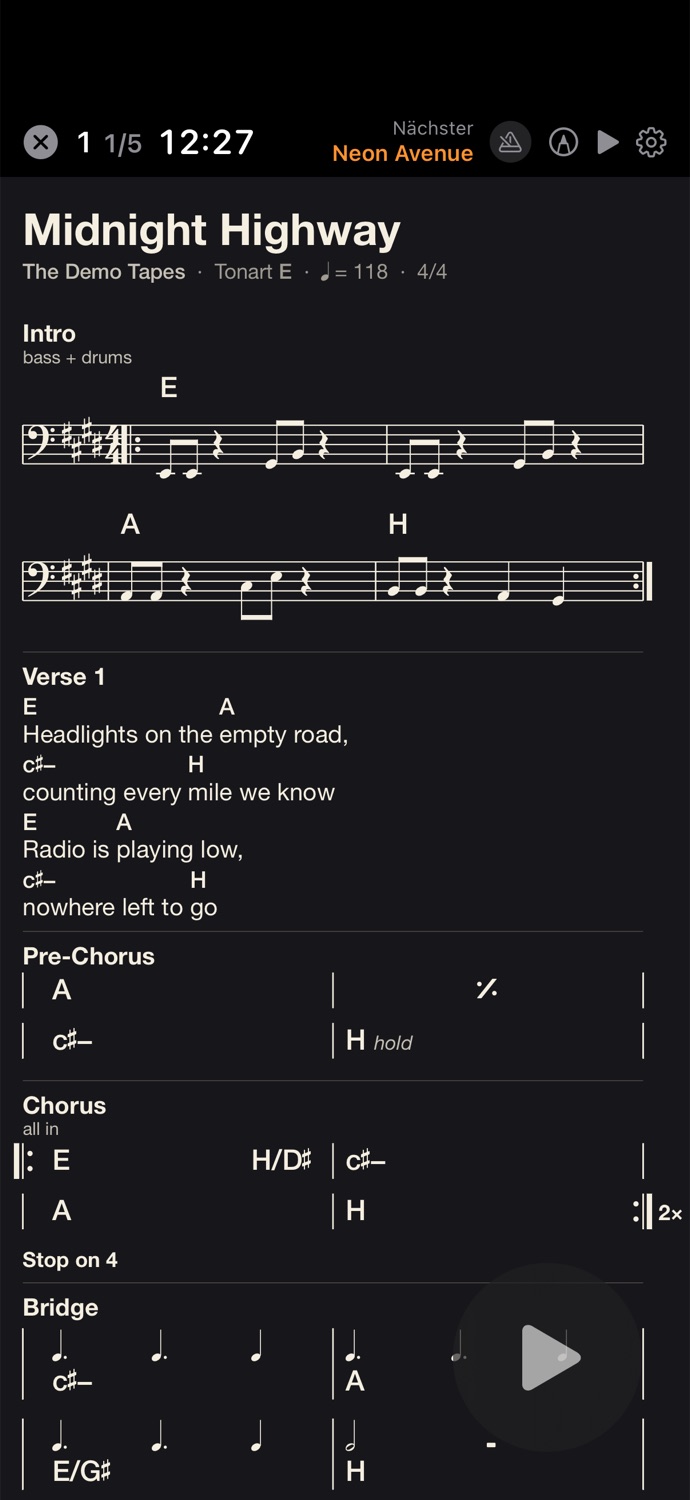
iPhone Live-Ansicht

Mehr als
Akkorde anzeigen.
More than
a chord viewer.

Akkord-Apps zeigen Text an, Notensatzprogramme wollen Layout-Arbeit, PDF-Reader blättern nur um. GigChart Pro arbeitet in Takten, Zählzeiten, Wiederholungen und Rhythmen. So steht die Musik so schnell auf dem Blatt, wie du sie spielst. Chord apps display text, notation software wants layout work, PDF readers just turn pages. GigChart Pro works in bars, beats, repeats and rhythms, so the music hits the page as fast as you play it.

Grafischer EditorVisual editor

Direkt im Blatt bearbeiten. Mit der Tastatur.Edit right on the chart. From the keyboard.

Klick auf einen Takt und tipp los. Mit ↑ wechselst du von den Akkorden in die Rhythmuszeile und weiter in die Zeile darüber. Jeder Schlag ist ein Ziel.Click a bar and start typing. ↑ moves from the chords into the rhythm row and on to the row above. Every beat is a target.

  • Akkord-Ebene: Akkorde auf jeden Schlag setzen, mit ⇧+Pfeilen markieren, kopieren und einfügenChord layer: place chords on any beat, select with ⇧+arrows, copy and paste
  • Stufen-Tasten 1–7 setzen die passenden Akkorde der Tonart (Nashville)Degree keys 1–7 enter the right chords for the key (Nashville)
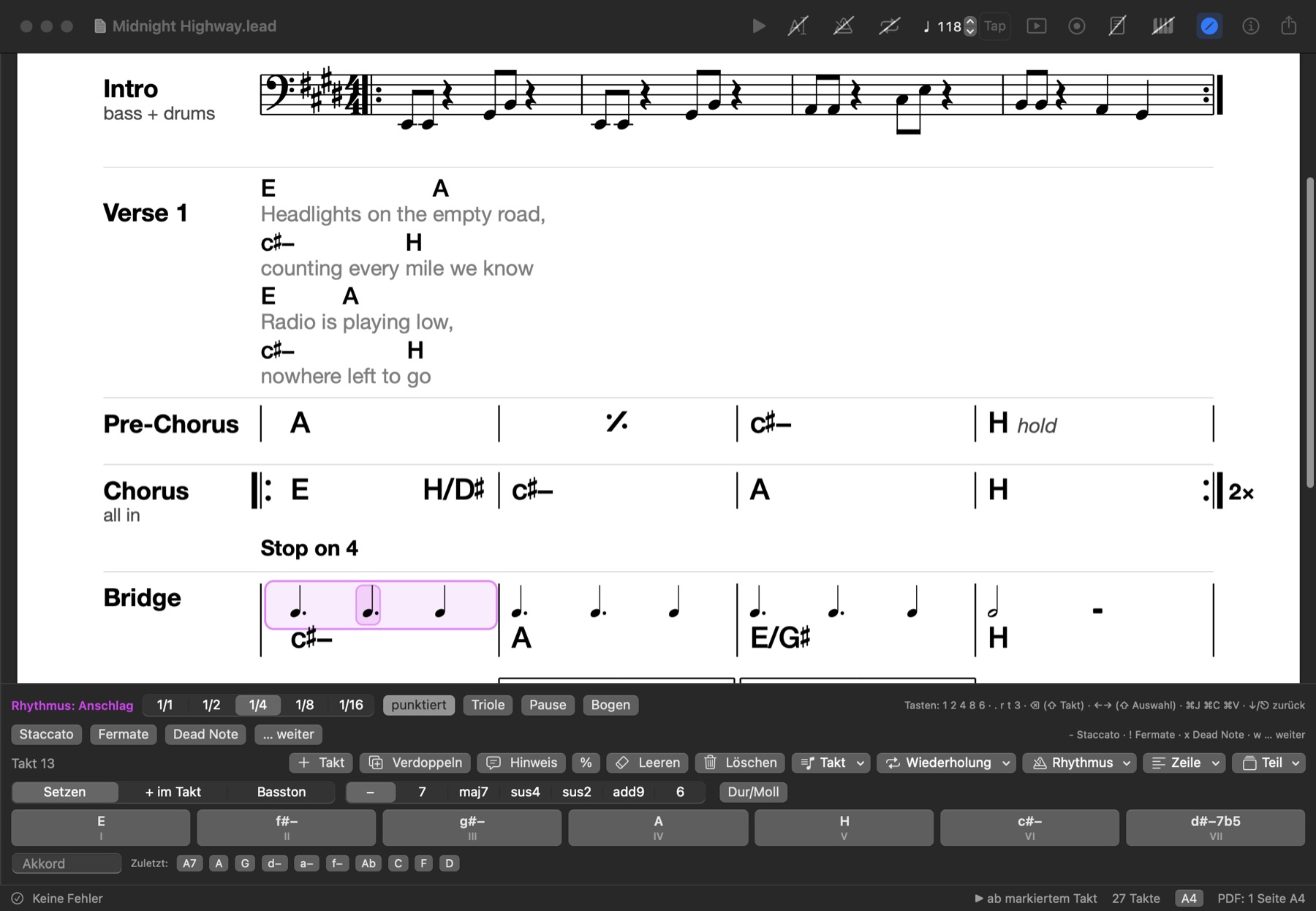
  • Rhythmus-Ebene: Notenwerte, Punktierung, Triolen, Staccato. ⌘J verbindet Noten, notfalls mit BogenRhythm layer: values, dots, triplets, staccato. ⌘J joins notes, with ties when needed
  • Hinweise wie „Stopp auf 4“ genau über den Schlag setzenPut cues like “stop on 4” exactly above the beat
  • Wiederholungen, Volten und Teile per Rechtsklick. Undo bleibt in der EbeneRepeats, endings and sections via right-click. Undo stays in your layer
Akkord-Ebene · Schlag 3Chord layer · beat 3
Akkord-Ebene
Rhythmus-Ebene
Text oder Klick, du hast die WahlText or click, your choice

Schreib einfach, was du spielst.Just write what you play.

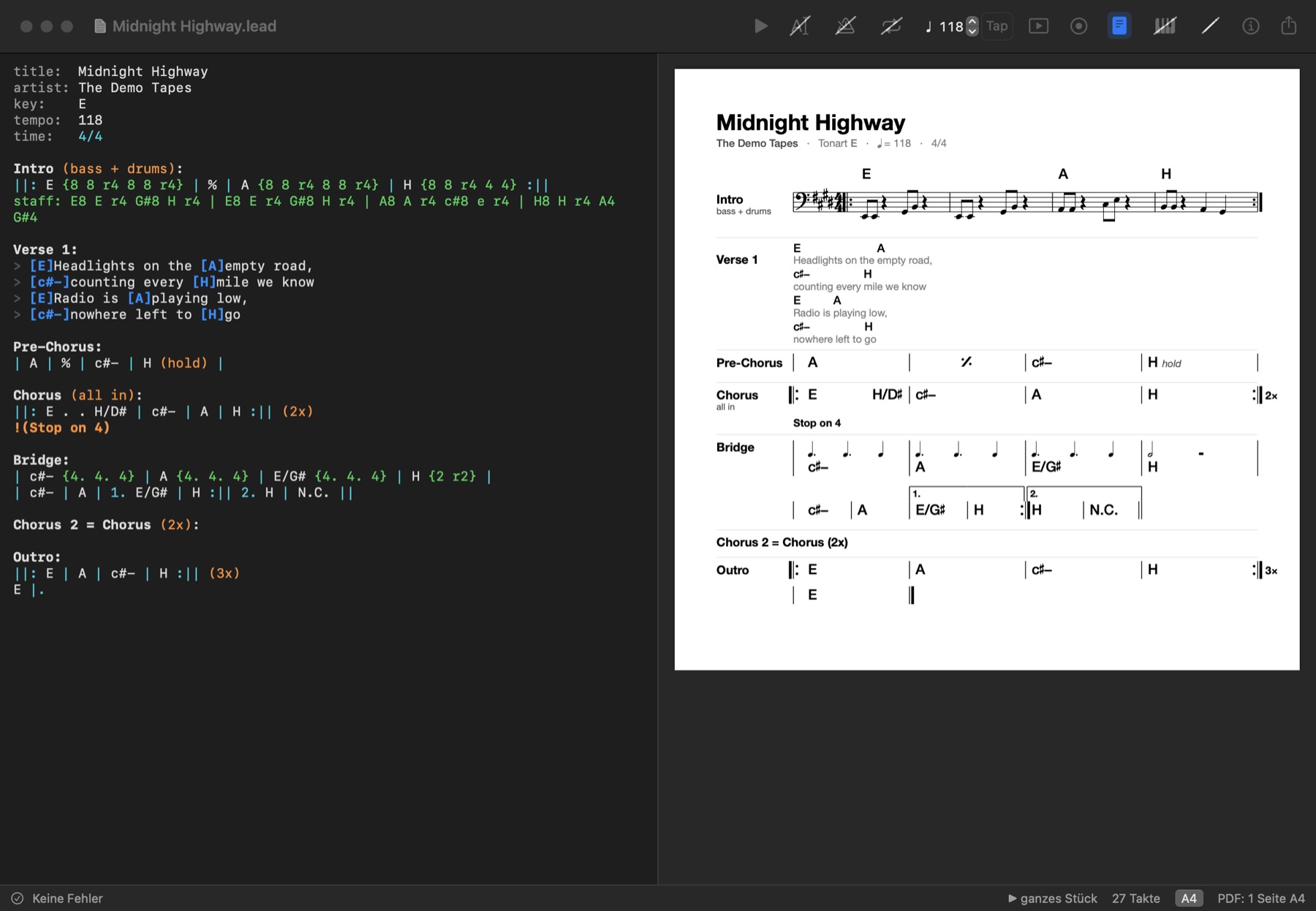
Unter jedem Blatt steht eine kleine, lesbare Notation. Takte, Wiederholungen, Rhythmen und Basslinien tippst du so, wie du sie spielst. Rechts entsteht sofort der fertige Satz, ganz ohne Layout-Arbeit.Every chart is backed by a tiny, readable notation. Type bars, repeats, rhythms and bass lines the way you play them. The engraved chart appears instantly, with zero layout work.

Chorus (all in): ||: E . . H/D# | c#- | A | H :|| (2x) !(Stop on 4) Bridge: | c#- {4. 4. 4} | A {4. 4. 4} | E/G# | H | staff: C#8 E G# r4 …
  • Notensystem, Tabulatur, Griffbilder für Gitarre und UkuleleStaff, tab, chord diagrams for guitar and ukulele
  • Transponieren mit richtiger Enharmonik, Capo auflösenTranspose with correct enharmonics, resolve capo
  • Abspielen mit Klick, Akkorden und Bass, ab jedem Takt und in SchleifePlayback with click, chords and bass, from any bar and in a loop
  • A4-PDF für die Band zum Teilen, Drucken und Sichern (Pro)A4 PDF for the band to share, print and save (Pro)
Text und Blatt nebeneinander
EinspielenCapture

Spielen statt tippen.Play it, don’t type it.

Der Klick läuft und du spielst einfach. GigChart Pro hört zu und schreibt es auf: Akkorde, Rhythmen und Riffs, quantisiert und als ganz normales Blatt, das du weiter bearbeiten kannst.The click runs, you play. GigChart Pro listens and writes it down: chords, rhythms and riffs, quantized, as a regular chart you can keep editing.

  • Rhythmus klopfen:Tap rhythms: Leertaste drücken ist der Anschlag, loslassen ist das Endepress the space bar to strike, release to end
  • Akkorde per Nashville:Chords by Nashville number: 1–7 im Takt, Basston mit ⌥1–7 in time, bass note with ⌥
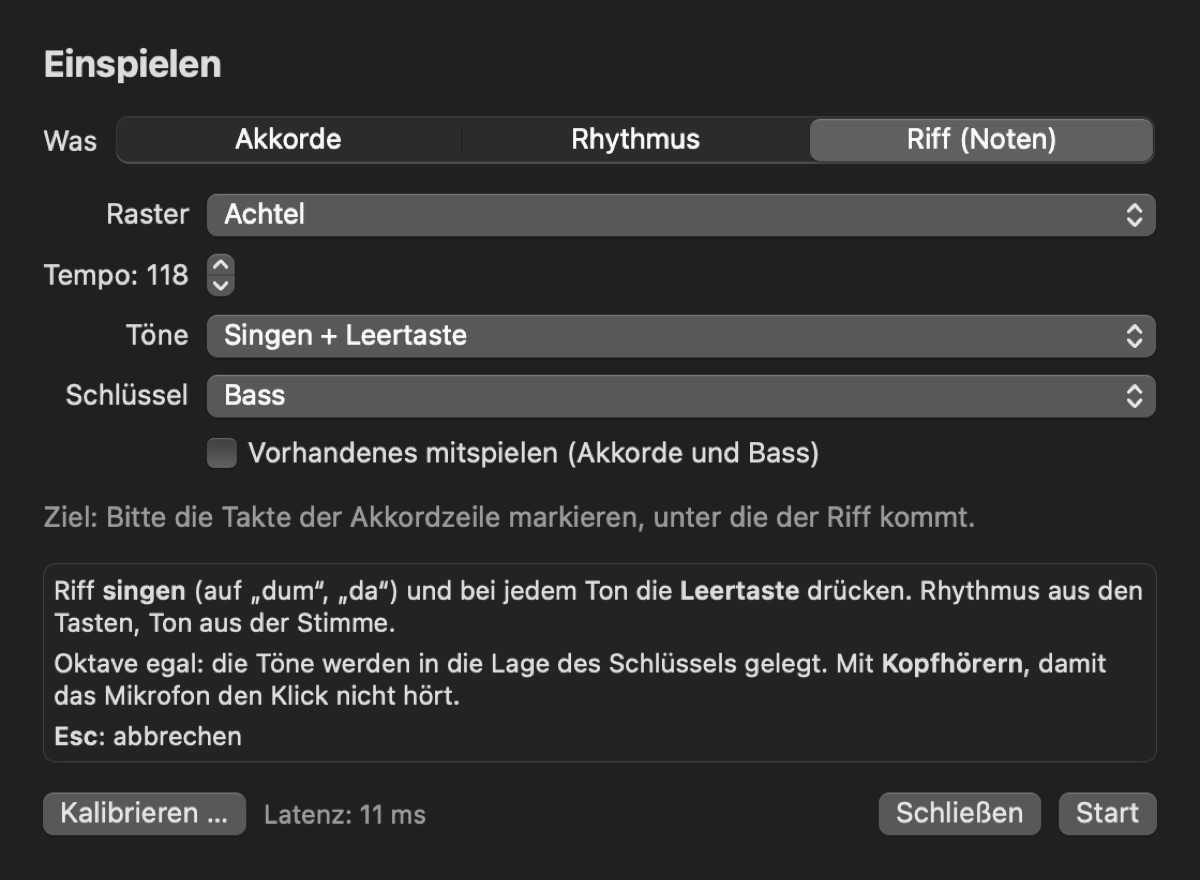
  • Riff singen:Sing a riff: Tonhöhe kommt aus der Stimme, Rhythmus aus Stimme oder Tastepitch from your voice, rhythm from your voice or a key
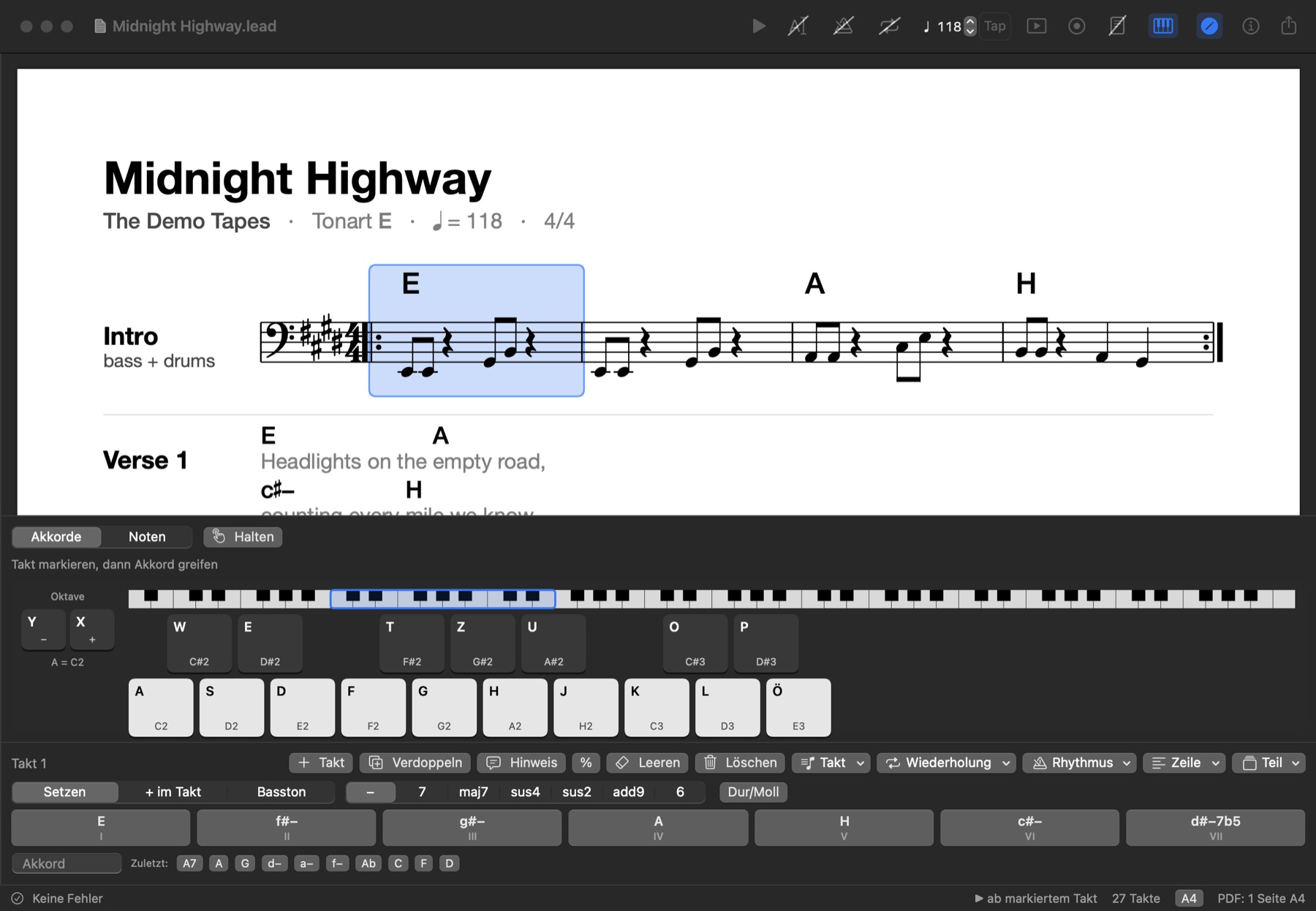
  • MIDI-Keyboard & Klaviatur:MIDI keyboard & on-screen keys: Akkord greifen, und er wird erkannt (auch maj7, m7b5, sus, Slash-Akkorde)play a chord and it’s recognized (incl. maj7, m7b5, sus, slash chords)
  • Latenz-Kalibrierung und TrefferanzeigeLatency calibration and timing feedback
Klaviatur mit Akkorderkennung
Riff singen
Aus einer Aufnahme · KI auf dem GerätFrom a recording · on-device AI

Probe aufgenommen? Chart ist fertig.Recorded the rehearsal? Your chart is done.

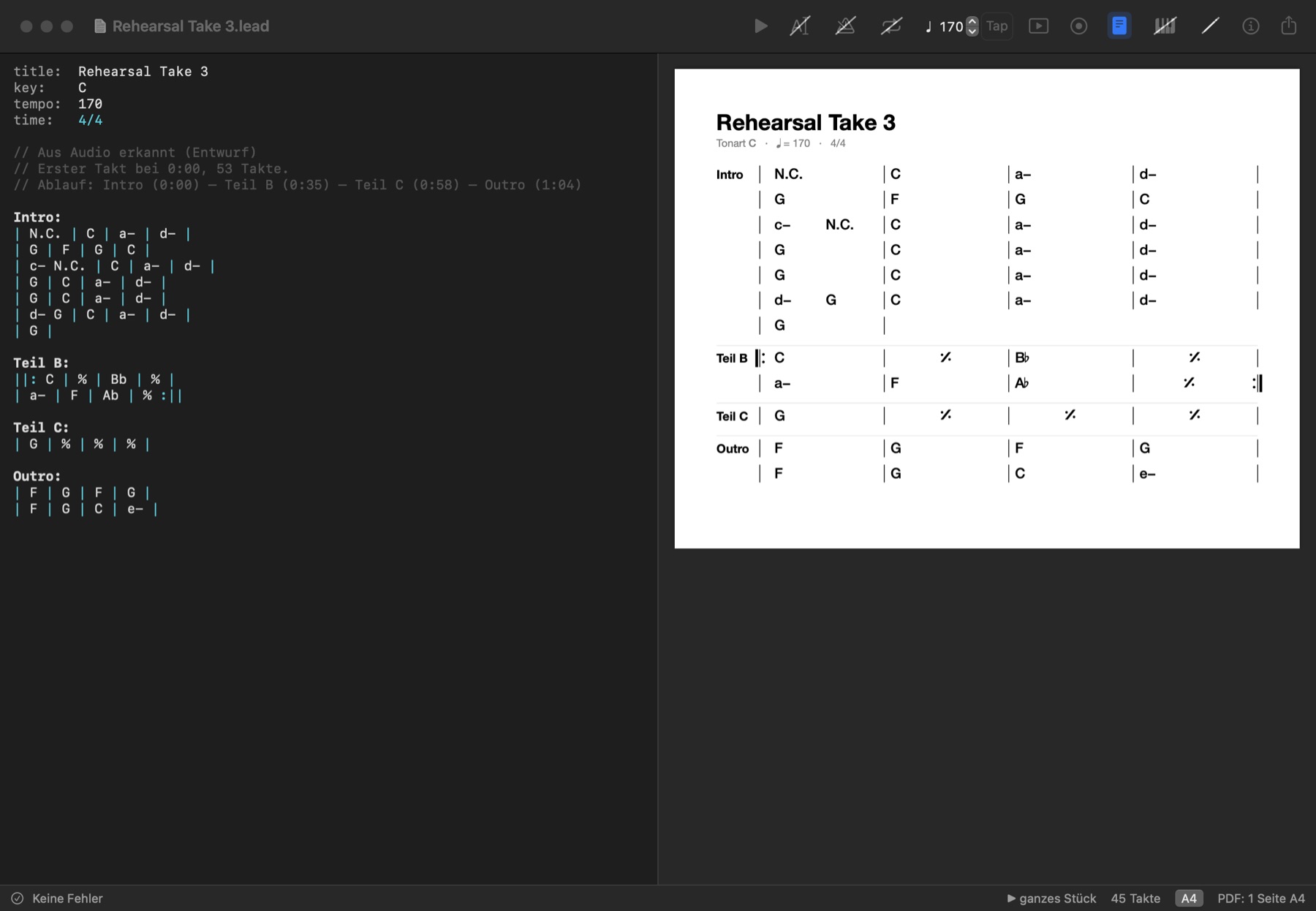
Zieh eine MP3, M4A oder WAV hinein. GigChart Pro misst Tempo, Taktart und Tonart, findet die Teile und ihren Ablauf und schreibt die Akkorde Takt für Takt. Das dauert Sekunden, läuft komplett auf deinem Mac und lädt nichts hoch.Drop in an MP3, M4A or WAV. GigChart Pro measures tempo, meter and key, finds the sections and their order, and writes the chords bar by bar. It takes seconds, runs entirely on your Mac and uploads nothing.

MP3
Rehearsal Take 3.mp31:15 · 170 BPM
Ganzer Mix, keine Spurtrennung nötigFull mix, no stems needed
→~6 s~6 s
Leadsheet aus Audio
Entwurf mit Tempo, Tonart, Teilen, Wiederholungen und AblaufDraft with tempo, key, sections, repeats and song map
⏱

Tempo & TaktartTempo & meter

4/4 oder 3/4, mit der Position der ersten Eins4/4 or 3/4, with the position of the first downbeat

🎼

Akkorde je TaktChords per bar

Fast 9 von 10 Takten exakt richtig (88 %, Grundton und Dur/Moll), gemessen an 37 echten BandaufnahmenNearly 9 out of 10 bars exactly right (88 %, root and major/minor), measured on 37 real band recordings

🧩

Form & AblaufForm & song map

Wiederkehrende Teile werden erkannt und als Wiederholung notiertRecurring sections are detected and written as repeats

🔒

PrivatPrivate

Die Analyse läuft lokal. Deine Demos verlassen den Rechner nichtAnalysis runs locally. Your demos never leave your computer

Unter der HaubeUnder the hood

Hört zu wie ein Musiker, rechnet wie ein Labor.Listens like a musician, computes like a lab.

GigChart Pro kombiniert klassische Signalanalyse mit einem neuronalen Netz für Akkorde. Beides läuft per Core ML direkt auf deinem Mac, ohne Cloud und ohne Upload.GigChart Pro combines classic signal analysis with a neural network for chords. Both run via Core ML right on your Mac, with no cloud and no upload.

  1. Puls findenFind the pulse Einsätze aus dem Spektrum, Tempo per Autokorrelation, jeder Schlag per dynamischer Programmierung.Onsets from the spectrum, tempo by autocorrelation, every beat by dynamic programming.
  2. Töne hörenHear the notes Ein Constant-Q-Spektrum zerlegt den Mix in Halbtöne. Das Schlagzeug wird ausgeblendet, der Bass getrennt gemessen, die Stimmung der Aufnahme ausgeglichen.A constant-Q spectrum splits the mix into semitones. Drums are filtered out, the bass is measured separately, the recording’s tuning is compensated.
  3. Akkorde erkennenRecognize chords Ein Transformer-Netz für Akkorderkennung (aus der Musikforschung, ISMIR) und die eigene Harmonie-Analyse stimmen gemeinsam ab. Ein Viterbi-Decoder macht daraus eine musikalisch sinnvolle Folge, inklusive Basstönen wie G/H.A transformer network for chord recognition (from music research, ISMIR) and our own harmony analysis vote together. A Viterbi decoder turns that into a musically sensible sequence, including bass notes like G/B.
  4. Takt & FormBars & form Wo sich Akkordwechsel häufen, liegt die Eins. Die Ähnlichkeit aller Takte zueinander zeigt, wo Verse, Chorus und Wiederholungen beginnen.Where chord changes cluster, there’s the downbeat. How similar every bar is to every other reveals where verses, choruses and repeats begin.

Ehrlich gesagt: Erkannt werden Dur, Moll, sus und Basstöne. Septakkorde, Melodie und Text bleiben bei dir. Wo es knapp war, ist der Akkord markiert, mit einem Vorschlag: Du hörst den Takt aus dem Original mit beiden Varianten und entscheidest per Klick, auf Wunsch an allen gleichen Stellen auf einmal.To be honest: it recognizes major, minor, sus and bass notes. Sevenths, melody and lyrics are up to you. Where it was a close call, the chord is marked with a suggestion: you hear the bar from the original with both options and decide with a click, at every matching spot at once if you like.

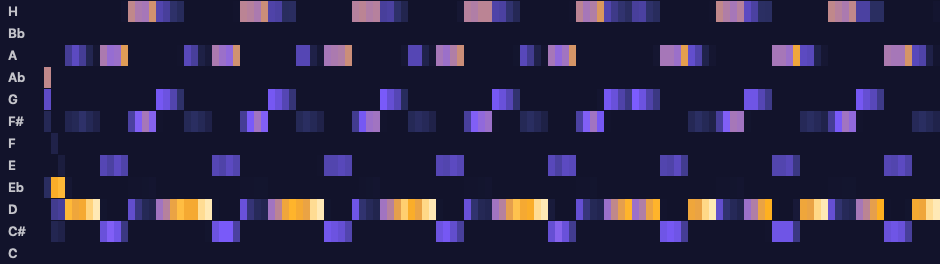
Chromagramm
Chromagramm: welche Töne auf jedem Schlag klingen. Hell = stark. Man sieht den Grundton D und jeden Akkordwechsel.Chromagram: which notes sound on every beat. Bright = strong. You can see the root D and every chord change.
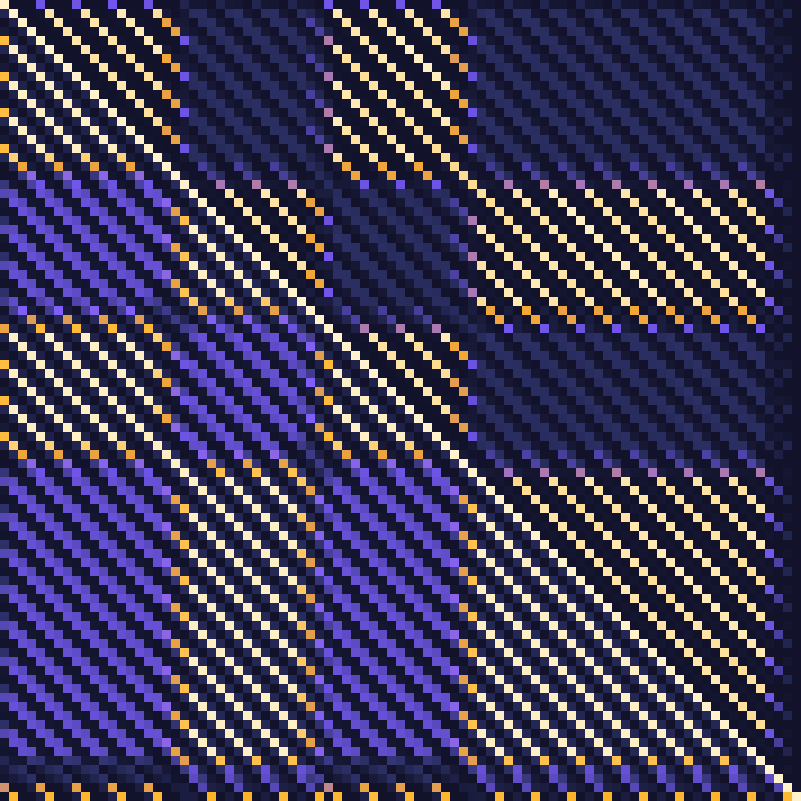
Ähnlichkeitsmatrix der Takte
Ähnlichkeit jedes Takts mit jedem anderen: Blöcke sind Teile, Diagonalen sind Wiederholungen. Daraus entstehen Verse, Chorus und „2x“.Similarity of every bar with every other: blocks are sections, diagonals are repeats. That’s where verse, chorus and “2x” come from.
Üben mit dem OriginalPractice with the original

Dein Blatt steuert die Aufnahme.Your chart drives the recording.

Leg die Aufnahme hinter dein Leadsheet, GigChart Pro ordnet sie Takt für Takt zu. Doppelklick auf den Refrain, und das Original spielt genau dort. Kein Suchen auf der Zeitleiste: Das Blatt ist das Inhaltsverzeichnis des Songs. Und wenn du die Akkorde des Blatts dazu spielen lässt, hörst du sofort, ob dein Chart stimmt.Put the recording behind your lead sheet and GigChart Pro matches it bar by bar. Double-click the chorus and the original plays right there. No scrubbing a timeline: the chart is the song’s table of contents. Let your chart’s chords play along and you hear right away whether it’s right.

🎯

Direkt an die StelleJump right there

Ab jedem Takt und jedem Teil, die Marke läuft im Blatt mitFrom any bar or section, with the playhead moving through the chart

🔁

Schleife über die BridgeLoop the bridge

Takte markieren, und genau die laufen immer wiederSelect the bars and exactly those repeat

🐢

Langsamer hörenSlow it down

Bis zum halben Tempo bei gleicher Tonhöhe, zum Raushören von Riffs und RhythmenDown to half speed at the same pitch, for working out riffs and rhythms

♯

In deiner TonartIn your key

Das Original in Echtzeit transponiert, passend zu deinem Blatt. Die Datei bleibt, wie sie istThe original transposed in real time to match your chart. The file stays untouched

Die Zuordnung bleibt, wenn du das Blatt umbaust: Wiederholungen, zusammengefasste Zeilen und neue Takte führen sie nach. Aufnahmen bleiben in deiner Bibliothek und werden nirgends hochgeladen.The match survives when you rework the chart: repeats, merged lines and new bars keep it in step. Recordings stay in your library and are never uploaded.

ImportierenImport

Aus totem PDF wird ein lebendes Leadsheet.Dead PDFs become living lead sheets.

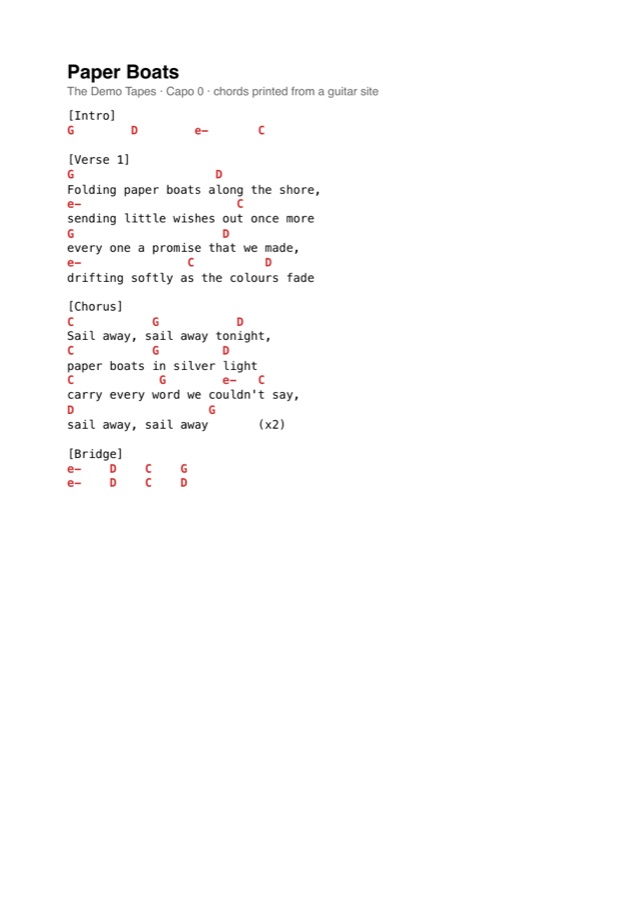
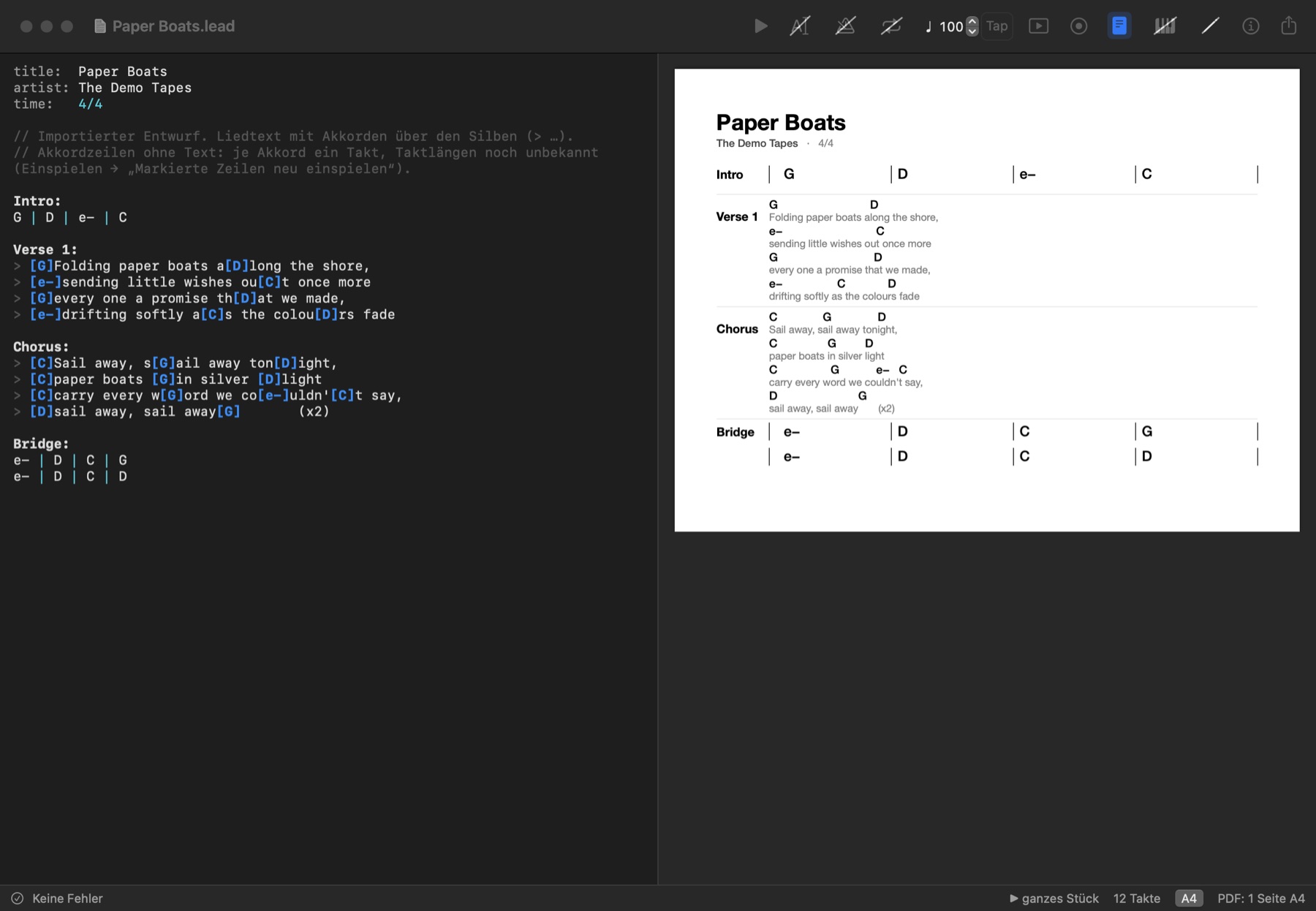
Akkorde über Liedtext aus PDF, Word, ChordPro, Songbook-Exporten oder kopiert von Gitarren-Seiten: GigChart Pro erkennt Teile, setzt die Akkorde auf die richtige Silbe und übersetzt deutsche Akkordnamen. Danach kannst du transponieren, abspielen, live spielen und weiter bearbeiten.Chords over lyrics from PDF, Word, ChordPro, songbook exports or copied from guitar sites: GigChart Pro detects sections, places every chord on the right syllable and normalizes chord names. Then transpose it, play it back, take it live and keep editing.

Akkord-PDF
Irgendein Akkordblatt als PDFAny chord sheet PDF
→⇧⌘I
Importiertes Leadsheet
Teile, Liedtext mit Akkorden über den Silben, Taktzeilen. Alles editierbarSections, lyrics with chords over syllables, bar lines. All editable
Setlist aus FotoSetlist from a photo

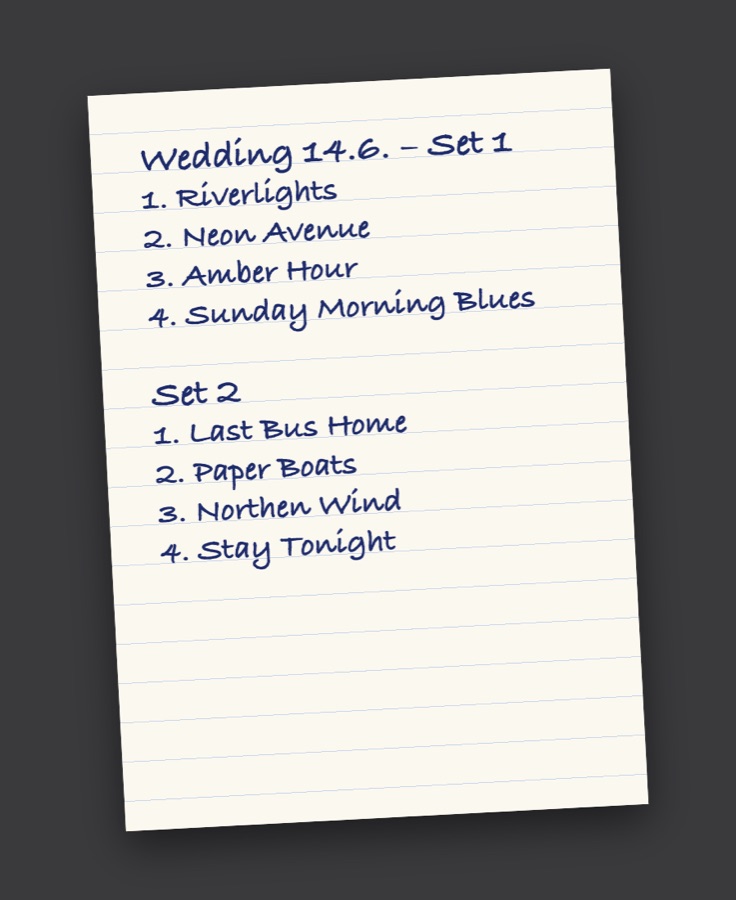
Der Zettel vom Sänger? In Sekunden deine Setlist.The singer’s scribbled list? Your setlist in seconds.

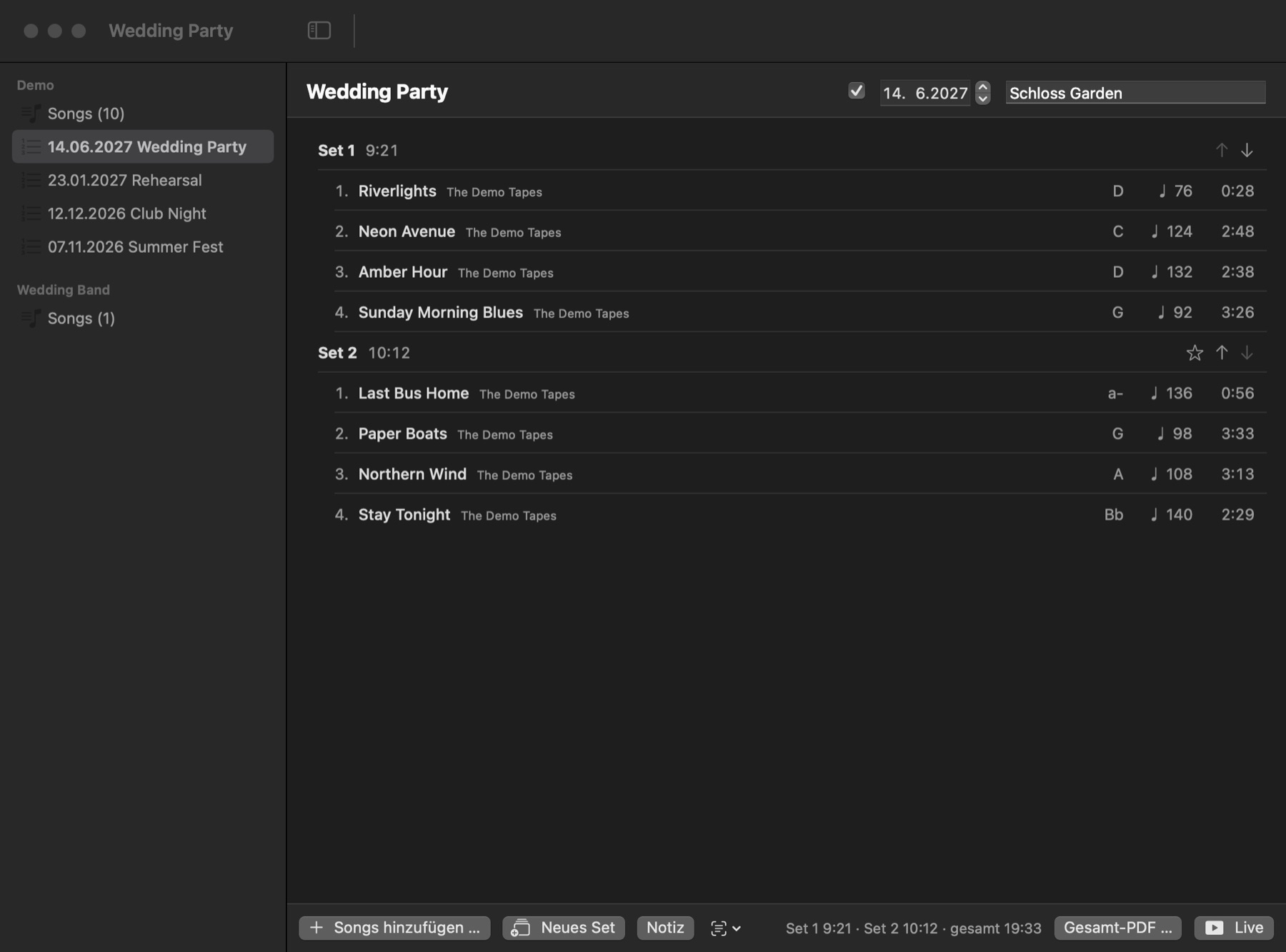
Fotografier die handgeschriebene Liste oder teil den Screenshot aus dem Band-Chat direkt an GigChart Pro. Die Texterkennung läuft auf dem Gerät, findet Sets und Zugaben und gleicht die Titel mit deinen Songs ab, auch bei Tippfehlern.Photograph the handwritten list or share the band chat screenshot straight to GigChart Pro. On-device text recognition finds sets and encores and matches titles to your songs, even with typos.

Foto einer handgeschriebenen Setlist
„Northen Wind“? Gemeint ist „Northern Wind“.“Northen Wind”? It knows you meant “Northern Wind”.
→TeilenShare
Setlist aus Foto
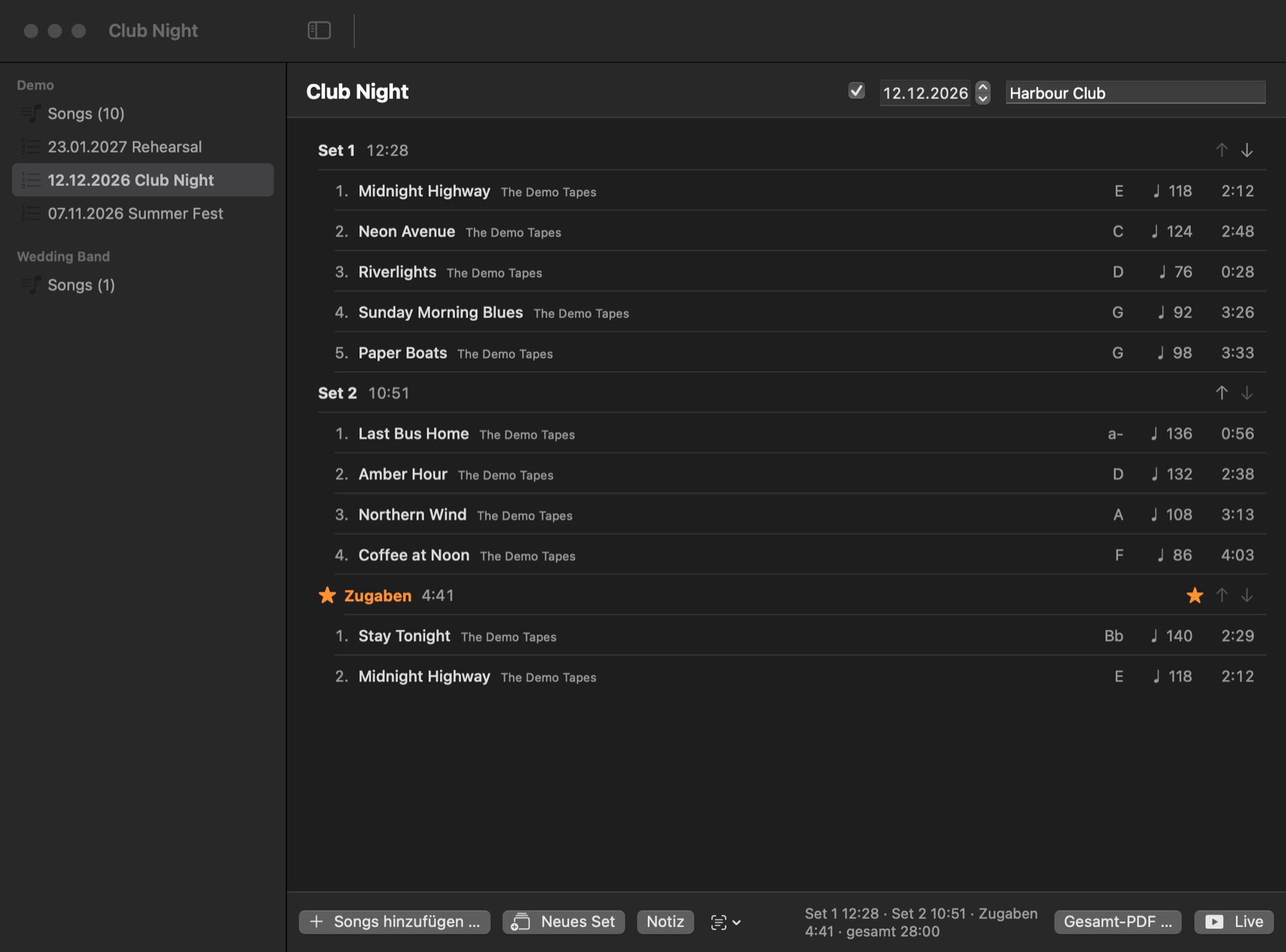
Zwei Sets mit Tonart, Tempo und Spielzeit, sofort bereit für LiveTwo sets with key, tempo and running time, ready for live
Auf der BühneOn stage

Gebaut für den Gig, nicht fürs Büro.Built for the gig, not the office.

Ein Song pro Bildschirm, groß und blendfrei. Weiterblättern per Fußschalter, Wischen oder Tippen. Oben siehst du Uhrzeit, Set-Position und den nächsten Titel. Alles liegt offline auf dem Gerät, auch wenn die Location kein Netz hat.One song per screen, big and glare-free. Advance with a foot pedal, swipe or tap. The header shows the time, set position and the next song. Everything is stored offline on the device, even when the venue has no signal.

iPad Live, Bühnen-Design, Stift-Notiz
Bühnen-Design: hell, aber nicht grell. Die rote Pencil-Notiz bleibt an ihrem Takt.Stage theme: bright, never glaring. The red Pencil note stays on its bar.
iPhone Live
iPhone: eigener schmaler Satz, zwei Takte pro ReiheiPhone: its own narrow layout, two bars per row
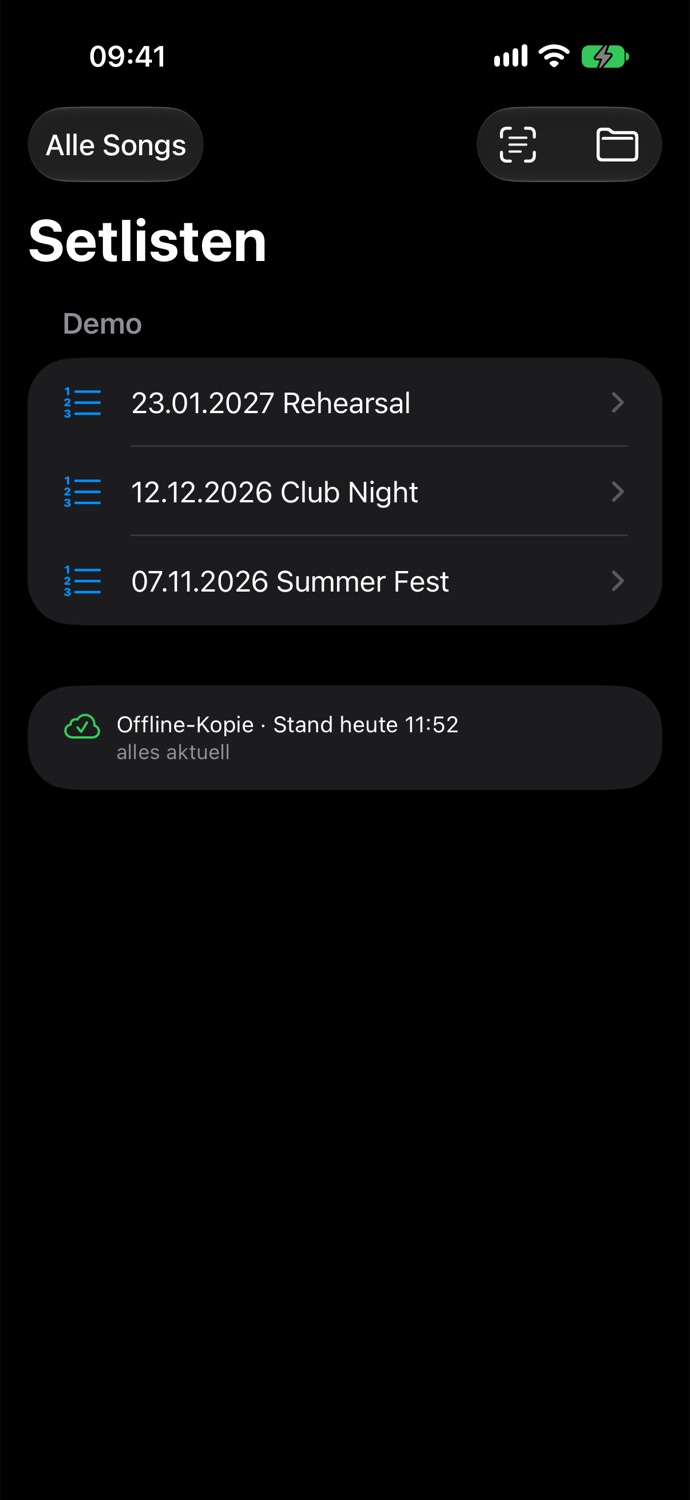
iPhone Setlisten
Setlisten offline bereitSetlists ready offline
🦶

FußschalterFoot pedal

Bluetooth-Pedale blättern bildschirmweise, am Ende kommt der nächste SongBluetooth pedals page screen by screen, then on to the next song

🔇

Stummes MetronomSilent metronome

Blinkende Punkte zum Anzählen, ganz ohne Ton im MonitorFlashing beats to count in, without a sound in your monitor

♯

Live transponierenTranspose live

Sängerin hat heute eine andere Tonart? Zwei Tipps, nur für diesen AbendSinger wants a different key tonight? Two taps, just for this show

📑

PDFs dabeiPDFs welcome

Vorhandene PDFs spielen mit, mehrseitige laufen nahtlos durchExisting PDFs come along, multi-page ones scroll seamlessly

MIDI auf der Bühne · ProMIDI on stage · Pro

Dein Rig schaltet mit.Your rig follows along.

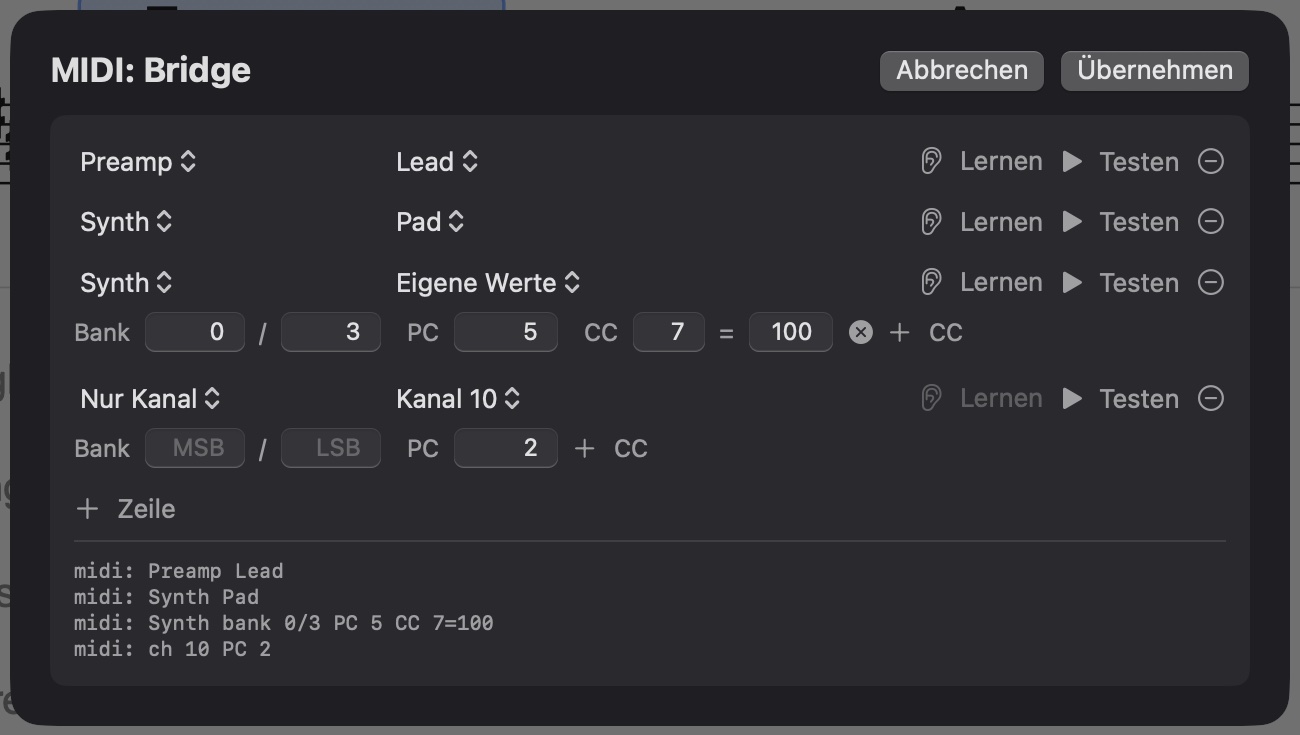
Song auf, und Effektgerät, Amp und Keyboard stehen auf dem richtigen Preset. Im Solo kommt der Lead-Sound, im Chorus mehr Hall. Gerät wählen, Sound wählen, fertig. Die Befehle stehen direkt im Blatt, nur nicht im PDF.Open a song and your effects, amp and keys jump to the right preset. Lead sound for the solo, more reverb in the chorus. Pick a device, pick a sound, done. The commands live right in the chart, never in the PDF.

  • Je Song und je Teil:Per song and per section: Im Dialog am Teil wählst du Gerät und Sound, „Testen“ schickt ihn sofort. Gesendet wird genau am ersten Takt des Teils, auch für PDF-Songs in der Setlist.in the section’s dialog you pick device and sound, “Test” sends it right away. It goes out right on the section’s first bar, for PDF songs in a setlist too.
  • Deine Geräte, deine Sounds:Your devices, your sounds: Preamp, Synth oder Effektgerät einmal anlegen und Sounds wie „Clean“ oder „Lead“ benennen. Mit „Lernen“ schaltest du einfach am Gerät um, und GigChart Pro übernimmt Program und Control Changes.set up your preamp, synth or effects once and name sounds like “Clean” or “Lead”. With “Learn”, just switch on the device and GigChart Pro picks up the program and control changes.
  • MIDI-Clock senden und empfangen:Send and receive MIDI clock: Das Songtempo geht an Drumcomputer, Delays und Looper. Oder GigChart Pro folgt der Clock aus DAW oder Drumcomputer, mit Metronom und Mitscrollen.the song tempo drives drum machines, delays and loopers. Or GigChart Pro follows the clock from your DAW or drum machine, with metronome and auto-scroll.
  • Du weißt immer, wo ihr seid:Always know where you are: Der aktuelle Takt ist dezent markiert, durch alle Wiederholungen und Volten, mit Durchgang („2/3“) und einstellbarem Einzähler. Ein Tipp auf einen Takt stellt nach.the current bar is subtly highlighted through every repeat and volta, with pass count (“2/3”) and adjustable count-in. Tap a bar to resync.
  • Fußschalter:Foot controllers: blättern, nächster Song oder Teil, Metronom, „Takt hier“. Belegung per „Lernen“, auch über Bluetooth-MIDI.turn pages, next song or section, metronome, “bar here”. Map by “learn”, Bluetooth MIDI too.
MIDI-Dialog: Gerät und Sound je Teil
Bibliothek & SetlistenLibrary & setlists

Jede Band, jeder Gig, alles synchron.Every band, every gig, always in sync.

Projekte für jede Band, Setlisten mit Sets und Zugaben samt Spielzeit, die aus Tempo und Ablauf berechnet wird. Die Dateien liegen als einfache Dateien in deinem iCloud Drive, sie gehören dir und sind in keinem proprietären Format eingesperrt.Projects per band, setlists with sets and encores and running times computed from tempo and form. Your songs live as plain files in your iCloud Drive: yours, not locked in a proprietary database.

  • Ziehen und Ablegen: Songs in Setlisten, Songs und Setlisten zwischen Bands, Dateien aus dem FinderDrag and drop: songs into setlists, songs and setlists between bands, files from the Finder
  • Tonart & Tempo pflegen: Vorschläge aus den Akkorden, aus Aufnahmen und onlineKey & tempo upkeep: suggestions from chords, recordings and online
  • Gesamt-PDF einer Setlist zum Ausdrucken oder Verschicken (Pro)Combined setlist PDF to print or send (Pro)
  • Mac, iPad und iPhone greifen auf dieselbe Bibliothek zuMac, iPad and iPhone share one library
  • Songs an die Band weitergeben, per AirDrop, Nachrichten oder Mail, mit PDF und Aufnahme. Neue Fassungen kommen als Update, eigene Ergänzungen bleiben (Pro)Share songs with your band via AirDrop, Messages or Mail, with PDF and recording. New versions arrive as updates, everyone keeps their own additions (Pro)
Bibliothek auf dem Mac

Der ehrliche VergleichThe honest comparison

Andere Apps machen einen Teil davon. GigChart Pro macht alles in einem Werkzeug, vom ersten Probenmitschnitt bis zum letzten Song der Zugabe.Other apps cover a slice. GigChart Pro does it all in one tool, from the first rehearsal recording to the last encore.

GigChart ProAkkord-/Songbook-AppsChord / songbook appsNotensatz-ProgrammeNotation softwarePDF-ReaderPDF readers
Takte, Wiederholungen, VoltenBars, repeats, endings✓~✓–
Rhythmus über den AkkordenRhythm above the chords✓–~–
Rhythmus & Akkorde einspielenCapture rhythm & chords✓–~–
Riffs singenSing riffs✓–––
Leadsheet aus AudioaufnahmeLead sheet from audio✓–––
Aufnahme taktgenau hinter dem BlattRecording bar-synced behind the chart✓~~–
PDF → editierbares BlattPDF → editable chart✓~––
Setlist aus FotoSetlist from photo✓–––
Kein Layout von HandNo manual layout✓✓––
Live-Modus mit FußschalterLive mode with foot pedal✓✓–✓
Stift-Notizen am Takt verankertPencil notes anchored to bars✓––~
BetaBeta

Bald im App Store.Coming soon to the App Store.

GigChart Pro ist in der Beta und wird gerade von Bands auf echten Gigs getestet. Bald gibt es die App für Mac, iPad und iPhone, ohne Abo und ohne Konto. Deine Songs bleiben deine Dateien.GigChart Pro is in beta and being tested by bands at real gigs. It’s coming soon for Mac, iPad and iPhone, with no subscription and no account. Your songs stay your files.

Mac, iPad, iPhoneMac, iPad, iPhone

Eine Bibliothek, synchron über iCloud.One library, synced via iCloud.

Offline auf der BühneOffline on stage

Alles liegt auf dem Gerät, auch ohne Netz.Everything lives on the device, no signal needed.

PrivatPrivate

Keine Werbung, kein Tracking, keine Uploads.No ads, no tracking, no uploads.

FAQ

Brauche ich Notenkenntnisse?Do I need to read music?

Nein. Akkorde und Takte reichen. Rhythmen klopfst du ein, Riffs singst oder spielst du. GigChart Pro kümmert sich um die Notation.No. Chords and bars are enough. Tap in rhythms, sing or play riffs, and GigChart Pro handles the notation.

Für welche Instrumente ist das?Which instruments is it for?

Für alle, die nach Akkorden spielen: Bass, Gitarre, Keys, Gesang. Basslinien im Bassschlüssel, Gitarren-Tabs, Griffbilder für Gitarre und Ukulele, Noten im Violinschlüssel.Anyone who plays from chords: bass, guitar, keys, vocals. Bass lines in bass clef, guitar tab, chord diagrams for guitar and ukulele, treble-clef notation.

Werden meine Aufnahmen hochgeladen?Are my recordings uploaded?

Nein. Audio-Analyse, Texterkennung von Fotos und PDF-Import laufen vollständig auf deinem Gerät.No. Audio analysis, photo text recognition and PDF import run entirely on your device.

Kann ich meine bestehenden PDFs weiter nutzen?Can I keep using my existing PDFs?

Ja. PDFs kommen unverändert in die Bibliothek und in Setlisten, oder du wandelst sie in editierbare Leadsheets um.Yes. PDFs go into your library and setlists as they are, or you convert them into editable lead sheets.

Wo liegen meine Songs?Where are my songs stored?

Als einfache Textdateien in deinem iCloud Drive. Auf iPad und iPhone gibt es zusätzlich eine Offline-Kopie, damit auf der Bühne nie etwas fehlt.As plain text files in your iCloud Drive. iPad and iPhone keep an offline copy so nothing is ever missing on stage.

Können wir in der Band Charts austauschen?Can we swap charts within the band?

Ja, Song für Song. Jeder hat seine eigene Bibliothek und darf darin alles anders machen: eigene Fassung, eigene MIDI-Befehle, eigene Notizen. Einen Song gibst du per AirDrop, Nachrichten oder Mail weiter, auf Wunsch mit Original-PDF und Aufnahme. Antippen, Band wählen, fertig. Schickst du später eine neue Fassung, zeigt die App, was sich ändert, und führt sie mit den eigenen Ergänzungen der anderen zusammen. Weitergeben gehört zu Pro, Übernehmen ist kostenlos.Yes, song by song. Everyone keeps their own library and can do things their way: their own version, their own MIDI commands, their own notes. Send a song via AirDrop, Messages or Mail, optionally with the original PDF and recording. Tap it, pick the band, done. When you send a new version later, the app shows what changes and merges it with the others’ own additions. Sharing is part of Pro, receiving is free.

Wer steht hinter GigChart Pro?Who is behind GigChart Pro?

GigChart Pro ist ein Produkt der superdigital GmbH, einer Software-Agentur aus Hamburg. Entstanden ist die App aus der Praxis: im Proberaum und auf der Bühne, mit echten Bands und echten Setlisten.GigChart Pro is made by superdigital GmbH, a software studio in Hamburg, Germany. It grew out of real practice: in rehearsal rooms and on stage, with real bands and real setlists.

Welche Funktionen gibt es auf welchem Gerät?Which features run on which device?

Mac: alles, inklusive Audio- und PDF-Import, Aufnahme hinterlegen und Riffs singen. iPad: Üben mit dem Original, Live, grafischer Editor, Klaviatur, MIDI, Einspielen, Stift-Notizen, Setlist aus Foto. iPhone: Live, Setlisten, Setlist aus Foto, Notizen. PDF-Export und Songs weitergeben (Pro) auf allen dreien.Mac: everything, including audio and PDF import, attaching recordings and singing riffs. iPad: practice with the original, live, visual editor, keyboard, MIDI, capture, Pencil notes, setlist from photo. iPhone: live, setlists, setlist from photo, notes. PDF export and song sharing (Pro) on all three.